 YanoSec
A misleading page can place an embedded trusted page beneath an apparent prize button, causing a click to hit a different control. This is clickjacking: the user's intended action and the actual target differ. An iframe is an HTML element that embeds another page.
Content Security Policy, or CSP, is a set of browser-enforced restrictions sent by a page. Its frame-ancestors directive limits which ancestor pages may embed that page. An ancestor includes a parent and any outer embedding pages. The directive addresses embedding, while the server must still authorize the underlying action.
Before you begin
- Recommended first
- Notes: scope, command, result, time, HTTP methods, headers, status codes, cookies, How a web app is put together, Same-origin policy, CORS
- Estimated time
- 16 min reading, 12 min activity. Setup and optional practice may take longer.
- Where you work
- Use the fictional page source, requests and policy models printed here in any current desktop or mobile browser. No server, login, framed account page or socket connection is required.
- Without a lab
- Read each source fragment or model and predict its result in notes. Identify the boundary, the supporting fact and one limit, then compare with the activity rubric. This does not reproduce a browser exchange. Reading works without JavaScript. Checking requires JavaScript and a secure context; saving additionally requires usable browser storage.
After this lesson you can:
- Describe the overlay of Prize on Save note.
- Separate the card that lists parents from the card that sets a color.
- Name the directive that restricts ancestors, using the question's words.
01Example
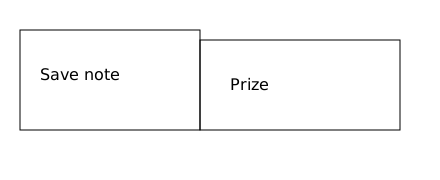
Worked picture: a Save note control beside a Prize label. The activity choice is Card F or Card C.
Left: Save note
Right: Prize
The picture is a diagram of an overlay. It does not submit a form.02Parents, not paint
The two-box drawing labels the intended visible lure Prize and the underlying Save note control. It represents the relationship; it is not a live framed page. Card F sends frame-ancestors 'self', allowing same-origin ancestors. The single quotes are part of the CSP keyword syntax. Card C only changes text color.
frame-ancestors is sent in the HTTP Content-Security-Policy response header. It checks every ancestor; it is not supplied through a meta element. frame-src has the other direction: which frames this page may load. Restricting parents addresses this framing mechanism, but it does not prevent every deceptive interface or replace authorization.
See a framed button under another label, and choose the policy that lists which parents may embed the page.Model. A teaching model drawn by hand. It shows the idea, not real tool output.
03Choose the card
Read the evidence before comparing with the activity rubric. The picture is the diagram, not a live frame.
Response policies for the notes page.

Card F
Content-Security-Policy: frame-ancestors 'self'
Meaning on this card: a parent may embed the page only when the parent is the same origin.
An untrusted parent is not on the list.

Card C
style color: green
Meaning on this card: the text color changes. Embedding is untouched.

frame-src would name where this page may load frames from.
frame-ancestors names who may embed this page.
MDN describes that difference. The directive checks ancestors.
- Name the two labels in the diagram.
- Read Card F and Card C. Write which one lists parents.
- Check: Card F lists parents and confines them to the same origin. Card C changes the color and leaves embedding untouched.
- Stop. Do not frame a real account page.
04Optional challenge
Explain why making the Prize label partly see-through does not decide the edit. The rubric is: the look is not the permission, and the edit still needs the server's check. About ten minutes.
05Fresh cases for the checks
Use these fictional cases for the checks below. They have different inputs from the worked examples. Read them here or make notes; no installation or external service is needed.
Frame case A: harmless overlay modelOwned fixture. An original file made for this course. Follow the activity's instructions in your own lab.
An outer page shows a label Open schedule.
A transparent frame is positioned over it so a click lands on the framed page’s Save preference control.
The model identifies the actual click target; no click or save occurs.
Frame case B: independent ancestor policyOwned fixture. An original file made for this course. Follow the activity's instructions in your own lab.
Protected page origin: https://notes.lab.invalid.
Response header: Content-Security-Policy: frame-ancestors 'self'
The directive checks every ancestor.
P: only ancestor is https://notes.lab.invalid.
Q: only ancestor is https://promo.lab.invalid.
R: nearest ancestor is https://notes.lab.invalid but an outer ancestor is https://promo.lab.invalid.
06Explain your evidence
Optional written self-check: explain one decision using the supplied case. No tool run is required.
Check your explanation: name the visible lure and actual target separately; test every ancestor against the page origin; distinguish frame-ancestors from frame-src and styling; retain server authorization as a separate requirement.
07Common mistakes
If you pick Card C, you changed the color. Embedding is the other card.
If you choose frame-src, you named where this page may load frames from. The card's job is who may embed this page.
If you treat the diagram as a submitted form, it is a picture.
References
- MDN: CSP frame-ancestors
Defines allowed embedding ancestors, keyword syntax, the HTTP-header requirement and the distinction from frame-src.
- PortSwigger: Clickjacking
Explains this mechanism, its impact and defenses. Required reasoning uses the original evidence printed on this page.