 YanoSec
An organization may manage many user and computer accounts through Active Directory Domain Services, or AD DS. A directory stores information as objects, such as users, computers and groups. An Active Directory domain groups directory objects under shared administration. Here domain means this identity-management structure, rather than a website name.
A domain controller is a server that holds the domain's directory information and supports sign-in and access decisions. Controllers replicate directory changes between them. A security group collects accounts so permissions can be assigned to a group. DNS helps clients locate controllers, but a DNS record itself does not store or manage those identities.
Before you begin
- Recommended first
- How a web app is put together, Same-origin policy, Binary, hex, Base64, and URL encoding, Passwords, hashes, and dumps
- Estimated time
- 14 min reading, 10 min activity. Setup and optional practice may take longer.
- Where you work
- Read the fictional cards in any current desktop or mobile browser. No installation, account, password tool, directory deployment or network request is required. Use only the evidence supplied on this page.
- Without a lab
- The page prints the evidence needed for the activity. Write your classifications and reasons in notes, then compare them with the activity rubric. This practices reasoning; it does not reproduce a live incident or tool operation. Reading works without JavaScript. Answer checking requires JavaScript and a secure browser context; saving progress also requires usable browser storage.
After this lesson you can:
- Name the server role that holds a copy of an Active Directory domain.
- Distinguish that server from a DNS A record.
- Say why a DNS name on a card is not permission to enter the directory.
01Example
Read the fictional directory inventory. The directory name and the separate DNS record use .invalid example names; neither is a target to query.
Directory name: club.lab.invalid
Users: mina, noor
Group: readers, with those two members
Domain controller: dc-1, holding a copy of this directory
Separate line: notes.lab.invalid A 192.0.2.44
The A record does not hold the user accounts.02A server, not a name
The fictional directory contains Mina, Noor and a readers group. The controller stores the directory; membership in readers can be used when granting access. Membership is not permission for every action, just as signing in did not authorize every file in the earlier lesson.
The separate A record maps a name to an IPv4 address. That is a DNS answer, not an account directory. A controller can use DNS without being the same thing as a DNS record. This is a simplified domain model; deployment, replication details and real administrative privileges remain outside the activity.
Identify the Active Directory domain controller, and keep it apart from a DNS record.Model. A teaching model drawn by hand. It shows the idea, not real tool output.
Read the full explanation below.
Separate DNS A record
Directory name: club.lab.invalid
Users: mina, noor
Group: readers, with those two members
Domain controller: dc-1, holding a copy of this directory
Separate line: notes.lab.invalid A 192.0.2.44
The A record does not hold the user accounts.
dc-1 holds a copy of the directory with the named users and readers group.
No directory is deployed.
dc-1 holds a copy of the directory with the named users and readers group. No directory is deployed.
Follow the explanation
- dc-1 holds a copy of the directory with the named users and readers group. No directory is deployed.
- The A record maps a separate host name to an IPv4 address. It does not store the user accounts.
Read every state and value
1. dc-1 holds a copy of the directory with the named users and readers group. No directory is deployed.
- Selected parts
- Directory controller · Directory users
- Explanation
- directory-note
2. The A record maps a separate host name to an IPv4 address. It does not store the user accounts.
- Selected parts
- Separate DNS A record
- Explanation
- dns-note
03Point at the DNS line
The activity check is the record that is not the server. The drawing repeats the text card. The text card is the required description.
Original fictional directory card. No domain was created. No account was signed in.
club.lab.invalid and notes.lab.invalid use the .invalid suffix. They are labels, not queries.
192.0.2.44 is a documentation address. No packet was sent.

Directory name on this card: club.lab.invalid
This is the name of the directory. It is not a website and it is not an A record.

Objects
User: mina
User: noor
Group: readers
  Members: mina and noor
  A security group collects accounts so a right can be given once.
Domain controller: dc-1
  A server that holds a complete copy of this domain's directory.
  Another controller would hold a copy too. This card has one.
  Clients use DNS to locate a domain controller. Finding the server is not the same as holding the accounts.

Separate DNS record
Name: notes.lab.invalid
Type: A
Data: 192.0.2.44
This record answers an address question. It does not hold user mina.
It is not a domain controller.
Reading an A record, or owning a DNS name, does not grant access to the directory.

Check: the DNS record is notes.lab.invalid.
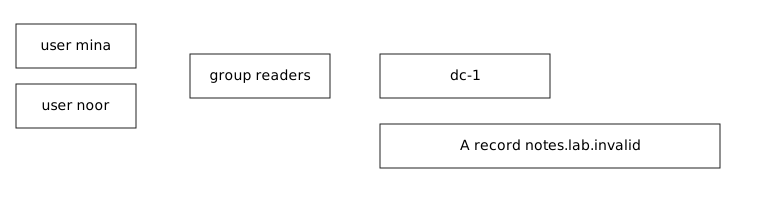
Download the directory drawing. The text card is the description.
- List the users, the group, the server role, and the A record on separate lines.
- Mark which line holds the accounts and which line only maps a name to an address.
- Check: the DNS record is notes.lab.invalid. dc-1 is the other kind of line.
- Stop. Do not create a directory, a user, or a DNS query.
04Optional challenge
Allow about ten minutes. Write two sentences distinguishing an Active Directory domain from a DNS name. In each sentence, identify what information is organized and what operation it supports. No installation or lookup is needed.
05Fresh cases for the checks
Use these fictional cases for the checks below. They have different inputs from the worked examples. Read them here or make notes; no installation or external service is needed.
Directory case A: independent fictional inventoryOwned fixture. An original file made for this course. Follow the activity's instructions in your own lab.
Directory name: grove.lab.invalid.
Users: Esi and Omi. Group: readers, containing those accounts.
Domain controller: dc-birch, holding a copy of this directory.
Separate DNS record: portal.grove.invalid A 192.0.2.105.
Grant: read this printed inventory during this lesson only. Excluded: directory sign-in, account changes and queries to external systems.
06Explain your prediction
Optional written self-check: Explain Active Directory’s account/group organization and a DNS name-to-address record as different uses of naming. State the controller role without treating a lookup or printed name as authorization.
07Common mistakes
If you chose the A record as the thing that manages accounts, you used the DNS lesson's object for the directory's job.
If you treated club.lab.invalid as a website, you used the directory's name as a page. The card says it is the directory name.
If you built a domain to check the card, you left the lesson. The card is the whole exercise.
References
- Microsoft Learn: Active Directory Domain Services overview
AD DS stores objects such as user and computer accounts. Sign-in and access control are integrated. Every domain controller in a domain holds a complete copy of that domain's directory information and replicates changes.
- Microsoft Learn: DNS and AD DS
AD DS uses DNS so clients can locate domain controllers and so controllers can communicate. The page applies to Windows Server 2016 through 2025.
- Microsoft Learn: Active Directory security groups
A user account represents a person. A security group collects user accounts, computer accounts, and other groups. The page applies to Windows Server 2016 through 2025. No group was created.