 YanoSec
In the Code stage, you followed data through a program. A program can also exchange data with a program on another computer. To follow that exchange, first identify the computers and the network between them.
A host is a device that sends or receives data as an endpoint of a communication. A network links devices so they can communicate. A network interface is the point through which a device joins a network, such as an Ethernet or Wi-Fi interface. One host can have several interfaces.
A local area network, or LAN, connects devices within a local area. In these cards, the LAN is one stated local segment, a part of the network the named hosts share. A router forwards traffic between networks. A text editor running on a host is a program, not an additional network device.
Before you begin
- Recommended first
- Files, programs, and processes, Processes, Packages with apt
- Estimated time
- 15 min reading, 15 min activity. Setup and optional practice may take longer.
- Where you work
- Use the supplied original network cards, packet tables and stream transcripts in any browser, including on a phone. You need no account, paid lab or live network access. Reading a saved file in Wireshark is optional; installation time is separate from the estimate. Optional challenges take about ten extra minutes.
- Without a lab
- The page prints every address, row and message needed for its activity. Follow the numbered steps in notes and label your conclusions as predictions or interpretations of supplied evidence. The pcapng files are synthetic, constructed examples; opening one is different from recording a network. Reading works without JavaScript. Answer checking needs JavaScript and a secure context, such as HTTPS. Saving correct progress also needs usable browser storage.
After this lesson you can:
- Identify hosts and a program on a supplied local segment.
- Locate the router and the network boundary from the node table.
- Explain why visibility of a device does not grant testing permission.
01Example
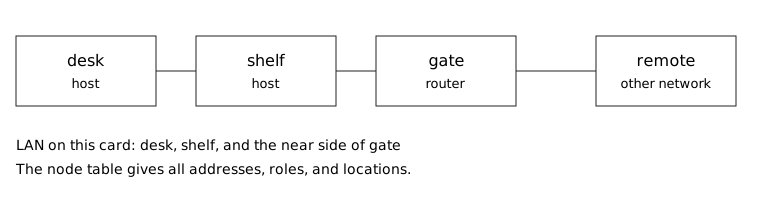
The fictional node table describes desk and shelf on one local segment and remote on another network. gate is the router between them. The names are labels for the model; the addresses do not come from your machine. Trace the path without sending any traffic.
Local hosts:
desk   192.168.50.10
shelf  192.168.50.23

Router on the local side:
gate   192.168.50.1

Host on another network:
remote 203.0.113.10 (documentation TEST-NET-3)

Modeled path: desk -> gate -> remote
A text editor on desk does not forward traffic between networks.02The segment and the boundary
Read the node table by columns: name, role, address and location. An address identifies where network data is directed. The next lesson explains its notation; here the location column supplies the local-versus-remote evidence.
desk and shelf share the local segment. Traffic from desk toward remote must cross the modeled boundary at gate. A real router has connections on more than one network; the drawing names only the local-side address needed for this case.
The internet is a network of interconnected networks. A router connects networks rather than turning every remote host into part of the local LAN. A virtual machine can also join a virtual network; a device need not have a separate physical cable for the distinction to matter.
Network visibility and permission are separate. A reachable device or a printed address is not permission to test it. The supplied tables and drawing provide all evidence for this activity.
Trace desk through gate to the documentation remote address; distinguish host applications from forwarding at the boundary.Model. A teaching model drawn by hand. It shows the idea, not real tool output.
Read the full explanation below.
Playback is optional. Step through at your own pace.
desk, shelf and gate share the stated local segment.
Follow the explanation
- desk, shelf and gate share the stated local segment.
- The supplied path crosses the router boundary: desk → gate → remote.
- A text editor on desk does not forward between networks.
Read every state and value
1. desk, shelf and gate share the stated local segment.
- Messages shown
- desk → gate
- Current message
- desk → gate
- Policy decisions
- None
- Participant roles
- Actor: desk — 192.168.50.10 (local segment); Text: Local host: 192.168.50.10. · Actor: shelf — 192.168.50.23 (local segment); Text: Local host: 192.168.50.23. · Actor: gate — 192.168.50.1 (router boundary); Text: Router local side: 192.168.50.1. · Actor: remote — 203.0.113.10 (documentation TEST-NET-3); Text: On another network; documentation address.
2. The supplied path crosses the router boundary: desk → gate → remote.
- Messages shown
- desk → gate · gate → remote
- Current message
- gate → remote
- Policy decisions
- None
- Participant roles
- Actor: desk — 192.168.50.10 (local segment); Text: Origin of the modeled path. · Actor: shelf — 192.168.50.23 (local segment); Text: No forwarding role is assigned to shelf. · Actor: gate — 192.168.50.1 (router boundary); Text: Forwards between the two networks. · Actor: remote — 203.0.113.10 (documentation TEST-NET-3); Text: Modeled remote destination; not a live target.
3. A text editor on desk does not forward between networks.
- Messages shown
- desk → gate · gate → remote
- Current message
- Not established
- Policy decisions
- None
- Participant roles
- Actor: desk — 192.168.50.10 (local segment); Text: The editor is a program on a host. · Actor: shelf — 192.168.50.23 (local segment); Text: Still a local host. · Actor: gate — 192.168.50.1 (router boundary); Text: The router retains the forwarding role. · Actor: remote — 203.0.113.10 (documentation TEST-NET-3); Text: No authorization to test is established.
03Label a second segment
The activity uses lamp, bench, gate, press and notes. Start with the role and location columns rather than guessing from a name. The complete table also describes the drawing in text, so you can follow it on a phone or paper.
Label each device as a local host, a boundary router or a host on another network. Then identify the program that runs on a host. Compare with the printed activity check only after making your own labels. Stop with that note; no packet needs to be sent.
Hosts and a network boundary

A host sends or receives data. A router forwards traffic between
networks. A program running on a host is not another network device.
Use the Role and Where columns before interpreting the addresses.
The worked and activity segments below are separate fictional cases.

North desk lab. Original fictional card. These are not addresses from your computer.

Worked segment
Node    Role     IPv4            Where
desk    host     192.168.50.10   on the local segment
shelf   host     192.168.50.23   on the local segment
gate    router   192.168.50.1    connects this segment to other networks
remote  host     203.0.113.10    other network, documentation block TEST-NET-3

desk and shelf share the local segment. This card calls that segment the LAN.
remote is outside it. A packet from desk to remote crosses gate.
A text editor running on desk does not connect the segment to other networks.

Activity segment
Node    Role           IPv4            Where
lamp    host           192.168.40.10   on the local segment
bench   host           192.168.40.23   on the local segment
gate    router         192.168.40.1    connects this segment to other networks
press   print service  198.51.100.20   other network, documentation block TEST-NET-2
notes   text editor    none            a program on lamp, not a network device

Predict before reading the check. Check: press is outside lamp's local segment.
- Mark lamp and bench as hosts on the local segment. Mark gate as the router.
- Mark press as the node on another network. Mark notes as a program on lamp.
- Check: press is outside lamp's local segment.
- Stop on the card. Do not send a packet and do not scan a network.
04Optional challenge
Allow about ten extra minutes. Loopback is a network path back to the same host. IPv4 addresses whose first dotted number is 127 are reserved for internal loopback and must not leave the host. The shorthand 127.0.0.0/8 describes that range; the address and subnet lessons explain the notation. Explain why sending to a loopback address would not reach another physical computer. No probe is needed for this explanation.
05Fresh cases for the checks
Use these fictional cases for the checks below. They have different inputs from the worked examples. Read them here or make notes; no installation or external service is needed.
LAN case A: independent node inventoryOwned fixture. An original file made for this course. Follow the activity's instructions in your own lab.
reed: host on local segment meadow; 10.24.6.12.
stone: host on local segment meadow; 10.24.6.30.
bridge: router connecting meadow to other networks; local address 10.24.6.1.
harbor: host on another network; 198.51.100.62 (documentation).
notepad: a text-editor program running on reed.
Model route from reed to harbor: reed → boundary device → harbor.
Grant: read this printed inventory only; no testing of listed hosts.
06Explain your prediction
Optional written self-check: Explain the local boundary, the forwarding role and the difference between a program and a host. Cite the permission line separately from reachability.
07Common mistakes
If notes looks like another device, check its role and location. It is the text editor running on lamp, not a host or forwarding device. Draw it inside that host instead of adding another network link.
If every printed address looks local, read the location column. press is explicitly on another network; sharing a worksheet does not mean sharing a LAN.
If you are unsure whether to answer gate or router, separate the device name from its role. The question asks for one of its two stated role words. Keep your explanation in notes and type only that word.
References
- RFC 1122: Requirements for Internet Hosts
Sections 1.1.1, 1.1.3, and 3.2.1.3. A host is the ultimate consumer of communication services. The Internet is interconnected packet networks. Loopback of the form 127 with anything must not appear outside the host.