 YanoSec
A packet description can mention an application message, TCP, an IP address and Ethernet at once. These describe different jobs in carrying the same data. A layer model groups those jobs so you can ask which part of the communication a question concerns.
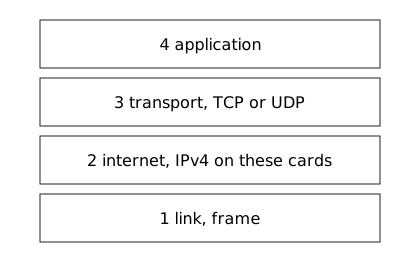
The four-layer Internet model used here has application, transport, internet and link layers. TCP/IP names this protocol family. OSI means Open Systems Interconnection and names another model with seven layers. Use the layer jobs first; the two models do not use the same count.
Before you begin
- Recommended first
- Files, programs, and processes, Processes, Packages with apt, TCP, UDP, and the three-way handshake
- Estimated time
- 15 min reading, 15 min activity. Setup and optional practice may take longer.
- Where you work
- Use the supplied original network cards, packet tables and stream transcripts in any browser, including on a phone. You need no account, paid lab or live network access. Reading a saved file in Wireshark is optional; installation time is separate from the estimate. Optional challenges take about ten extra minutes.
- Without a lab
- The page prints every address, row and message needed for its activity. Follow the numbered steps in notes and label your conclusions as predictions or interpretations of supplied evidence. The pcapng files are synthetic, constructed examples; opening one is different from recording a network. Reading works without JavaScript. Answer checking needs JavaScript and a secure context, such as HTTPS. Saving correct progress also needs usable browser storage.
After this lesson you can:
- Match communication responsibilities to the four Internet layers.
- Trace frame, IP, transport and application content from outside inward.
- Distinguish this model from the seven-layer OSI list.
01Example
This worked note uses UDP rather than TCP. Encapsulation means carrying one unit inside another. Read from the application outward to construct the wrapping, or from the outer Ethernet frame inward to inspect it. No packet was built for this model.
Application content: the note
Inside a transport unit: UDP datagram
Inside an internet unit: IPv4 packet
Inside a local-link unit: Ethernet frame

Outermost -> innermost:
Ethernet frame -> IPv4 packet -> UDP datagram -> note02Roles, not a perfect box
The application layer provides the program's communication meaning, such as a note or page message. The transport layer provides end-to-end communication between application endpoints; TCP and UDP belong here. The internet layer handles IP addressing and delivery across networks. The link layer carries data over the local link.
A header is control information attached to a unit of data. Its payload is the data it carries. A TCP segment or UDP datagram becomes payload inside an IP packet, which becomes payload inside a link frame. These names describe nested units, not four unrelated copies of the application message.
For a fresh guided example, a weather update rides in UDP, then IPv4, then Ethernet. To inspect it from outermost to innermost, start with the frame and follow what it contains. To describe sending from the application outward, use the reverse order. State the requested direction before ordering the units.
The usual OSI list is physical, data link, network, transport, session, presentation and application, counted upward. The Internet model combines responsibilities differently, especially in its application layer. Layer names are useful reasoning aids; a real implementation need not expose one independent software component per box.
An address problem and a message-format problem can therefore require different evidence. Use the model to locate responsibility, then inspect actual behavior. A label alone does not establish why communication failed.
Unwrap the nested Ethernet frame → IPv4 packet → UDP datagram → note while keeping the simplified four-layer and seven-layer model distinction visible.Model. A teaching model drawn by hand. It shows the idea, not real tool output.
Read the full explanation below.
Playback is optional. Step through at your own pace.
The four Internet responsibilities and seven OSI labels are an approximate teaching map, not an exact implementation diagram.
The outer Ethernet frame has the local-link role.
Follow the explanation
- The outer Ethernet frame has the local-link role.
- Open Ethernet to inspect the enclosed IPv4 packet and internet role.
- Open IPv4 to inspect UDP transport, retaining enclosing layers.
- Open UDP to reach note content inside all three units.
- Compare four Internet responsibilities with seven OSI labels as an approximate map.
Read every state and value
1. The outer Ethernet frame has the local-link role.
- Opened Layer
- None
- Selected Layer
- Link
- Legend Visible
- No
2. Open Ethernet to inspect the enclosed IPv4 packet and internet role.
- Opened Layer
- Link
- Selected Layer
- Internet
- Legend Visible
- No
3. Open IPv4 to inspect UDP transport, retaining enclosing layers.
- Opened Layer
- Link · Internet
- Selected Layer
- Transport
- Legend Visible
- No
4. Open UDP to reach note content inside all three units.
- Opened Layer
- Link · Internet · Transport
- Selected Layer
- Application
- Legend Visible
- No
5. Compare four Internet responsibilities with seven OSI labels as an approximate map.
- Opened Layer
- Link · Internet · Transport
- Selected Layer
- Application
- Legend Visible
- Yes
03Label the status note
Use the weather-update example as the guided exercise before reading the separate status-note reference. Identify each unit's job, then trace containment from the outer frame toward the content.
The outline supplies a complete text alternative to the drawing, including both layer lists and the unit order. The later checks use the status-note case and TCP instead of UDP. Apply the same roles to that case without copying the guided content label.
Read the units from the outside inward

A layer groups communication responsibilities. A header gives control
information; its payload is the carried data. In these examples a link
frame carries an IPv4 packet, which carries a TCP segment or a UDP
datagram, which carries application content. This is encapsulation.

Fresh guided case: a weather update carried by UDP.
Outermost -> innermost:
Ethernet frame -> IPv4 packet -> UDP datagram -> weather update
Application outward uses the reverse order. State the direction first.

Two maps. They are teaching labels, not a claim that every protocol has one perfect box.

Internet map used in this lesson
4 application   the note or page a program sends
3 transport     TCP or UDP, end to end for applications
2 internet      IPv4 addressing on these cards
1 link          the frame on the local segment

OSI names used beside that map
7 application
6 presentation
5 session
4 transport
3 network
2 data link
1 physical
Keep this seven-layer list separate from the four-layer Internet model.
RFC 1122 says the Internet application layer combines the OSI presentation and application jobs.

Worked stack, a short note carried by UDP. Name lookup is a later lesson.
application   the note
transport     UDP
internet      IPv4
link          Ethernet frame

Separate status-note pieces for the later checks, not yet assigned to layers
Status note
TCP segment
IPv4 packet
Ethernet frame
Apply the layer responsibilities to these pieces in the later checks.
- Use the fresh weather-update case in the outline. Name its application content, UDP transport, IPv4 packet and Ethernet frame before considering the separate status-note reference.
- Draw one containing box per unit. Put weather-update content inside UDP, UDP inside IPv4, and IPv4 inside Ethernet. Read the result from outermost to innermost.
- Check your drawing: Ethernet frame -> IPv4 packet -> UDP datagram -> weather update. Explain how each unit carries the next.
- Leave the separate status-note TCP case for the later checks. Stop with the drawing and explanation; no packet needs to be built or sent.
04Optional challenge
Allow about ten extra minutes. Write one question per Internet layer: what does the application message mean; which transport carries it; which IP addresses are involved; and which local-link frame carries the packet? Explain which supplied evidence could answer each question.
05Fresh cases for the checks
Use these fictional cases for the checks below. They have different inputs from the worked examples. Read them here or make notes; no installation or external service is needed.
Layer case A: fresh containmentOwned fixture. An original file made for this course. Follow the activity's instructions in your own lab.
Message: a temperature update.
Transport: UDP datagram.
Internet wrapper: IPv4 packet.
Local-link wrapper: Ethernet frame.
Each wrapper carries the next inner unit.
Case question: local Ethernet delivery is failing although the IPv4 destination and application content are supplied correctly.
06Explain your prediction
Optional written self-check: Give each unit’s responsibility and requested containment direction. Use a layer to guide evidence collection without treating the layer name as a complete diagnosis.
07Common mistakes
If an order reverses halfway through, write outermost or innermost at its start. Inspecting the wrapping from Ethernet inward differs from constructing it from the application outward.
If you place TCP with the page content, distinguish the application's meaning from the transport carrying its bytes. Read each layer's job before choosing its label.
If you mix an OSI number with the Internet map, choose one model consistently. The question names the four-layer model, so use its layer names.
References
- RFC 1122: Requirements for Internet Hosts
Section 1.1.3. The Internet layers used here are application, transport, internet, and link. The application layer combines the OSI presentation and application jobs. Compare responsibilities rather than treating the two models as identical.
- RFC 9293: Transmission Control Protocol
The introduction. TCP is the reliable ordered byte-stream service under the application. It is cited here for TCP's job, not for a new handshake exercise.