 YanoSec
The previous HTTP lesson showed readable requests and responses. HTTPS protects that exchange in transit with TLS, Transport Layer Security. In this lesson’s TCP-based model, the client first establishes TCP, then TLS, then exchanges HTTP messages. An omitted HTTPS port defaults to 443.
TLS provides confidentiality, meaning application data is protected from reading by an observer between the endpoints, and integrity, meaning unauthorized changes to protected data can be detected. Authentication checks the peer’s identity under the trust rules in use. In normal certificate-based HTTPS, the client checks the server; client certificates are optional.
A certificate is a signed statement connecting an identity, such as a hostname, with a public key used in the connection’s identity check. A public key is a value others can use to check a cryptographic proof; the server keeps a corresponding private key secret. A certificate authority, or CA, signs certificates. A trust store is the set of authorities the client accepts for these checks. You will compare supplied hostname cards; you do not need to fetch a certificate or change a trust store.
Before you begin
- Recommended first
- Hosts, LANs, and the internet, Ports and the services behind the common ones, TCP, UDP, and the three-way handshake, Variables, strings, lists, dicts, conditions, loops, HTTP methods, headers, status codes, cookies
- Estimated time
- 15 min reading, 15 min activity. Setup and optional practice may take longer.
- Where you work
- Use the complete printed cards with paper or a text editor for notes. No account, external target, or installation is required. A local HTML file can be read as source; that reading does not perform an HTTP exchange. The curl lesson gives a separate optional loopback-lab procedure.
- Without a lab
- The cards provide the names, byte counts, requests, responses, and stored records needed for the activity. Make a prediction and compare with the supplied reasoning; a practical run can wait. Reading works without JavaScript. Answer checking needs JavaScript and a secure context, normally HTTPS or a local preview. Saving additionally needs usable browser storage.
After this lesson you can:
- Place TLS in this lesson’s TCP-based HTTPS sequence.
- Compare the requested hostname with a supplied certificate identity.
- Distinguish connection protection from a judgment about content or permission.
01Example
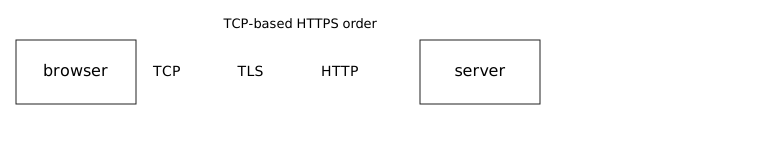
The diagram and text describe a TCP-based HTTPS connection. TCP setup, TLS setup, and the HTTP exchange are stages between the browser and server, not three relay computers. No handshake, the setup exchange that establishes connection protection, was captured. Read the complete order below even if the drawing is unavailable. HTTP/3 uses QUIC, a transport protocol with TLS protection built in; this drawing models the TCP case.
browser, then TCP, then TLS, then HTTP, then the server
Default port when the URL omits one: 443
The channel authenticates the server under the trust rules in use.
It does not establish the accuracy of the page’s claims.02What the channel covers
The protected channel runs between TLS endpoints. For this model they are the browser and the server. After successful setup, TLS protects application data along that connection. It does not protect data after an endpoint has decrypted it for the application.
A certificate check includes whether the requested hostname matches an allowed identity and whether the certificate is accepted under the client’s trust rules. The activity isolates only the name comparison and assumes its other fictional checks pass. A name match alone is not a complete certificate validation.
An observer can still learn facts such as the destination IP address and traffic sizes or timing. TLS does not promise to hide all communication metadata. The lesson makes no claim about whether a particular handshake hides the hostname.
A valid certificate does not review the operator’s honesty, the accuracy of page text, or whether the current account may access data. The server still needs authorization checks, decisions about permitted actions. If a browser reports a certificate warning, stop and inspect it rather than bypassing it. Installing a new CA changes trust and is outside this activity.
Place TLS between TCP and HTTP in the supplied model; connection protection does not establish page truth or permission.Model. A teaching model drawn by hand. It shows the idea, not real tool output.
Read the full explanation below.
Playback is optional. Step through at your own pace.
TCP comes before TLS in this supplied model.
Follow the explanation
- TCP comes before TLS in this supplied model.
- TLS protects the connection and authenticates the server under the trust rules.
- HTTP data follows TLS; accurate page claims and testing permission remain unestablished.
Read every state and value
1. TCP comes before TLS in this supplied model.
- Messages shown
- tcp
- Current message
- tcp
- Policy decisions
- Status: pending
- Participant roles
- Actor: Browser; Text: Establishes TCP in the model. · Actor: Server under the trust rules in use; Text: No certificate identity is supplied.
2. TLS protects the connection and authenticates the server under the trust rules.
- Messages shown
- tcp · tls
- Current message
- tls
- Policy decisions
- Status: permitted-model
- Participant roles
- Actor: Browser; Text: Uses the modeled protected channel. · Actor: Server under the trust rules in use; Text: Authentication is subject to trust rules; no certificate details invented.
3. HTTP data follows TLS; accurate page claims and testing permission remain unestablished.
- Messages shown
- tcp · tls · http
- Current message
- http
- Policy decisions
- Status: permitted-model
- Participant roles
- Actor: Browser; Text: Default omitted port is 443. · Actor: Server under the trust rules in use; Text: A protected channel is not evidence that page claims are accurate.
03Match the hostname
The cards supply a requested hostname and two possible certificate names. Treat them as a comparison exercise, not real certificates. Cover the check while you select the name that matches.
Original fictional certificate cards. No certificate was fetched.
Do not click past a warning. Do not install a CA for this lesson.

Requested hostname: note.lab.invalid

Card A
Hostname on the certificate: note.lab.invalid
This card's fictional result: the name matches

Card B
Hostname on the certificate: other.lab.invalid
This card's fictional result: the name is different

Assume the other fictional trust checks pass; compare the requested name separately.
A local test CA would be a separate trust store from a public one.
This lesson does not create either store.
Check: card A matches the requested hostname.
- Write TCP → TLS → HTTP for this model and default HTTPS port 443. Describe the protection TLS adds before the application exchange.
- Read the requested hostname note.lab.invalid. Compare the complete name with each card: A has that name; B has other.lab.invalid.
- Select A for the name match. State the limit: the activity assumes other trust checks pass and does not perform a real validation.
- Stop after the comparison and its limit. Do not fetch a certificate, install a CA, or click past a warning to complete it.
04Optional challenge
For about ten extra minutes, name a fact an on-path observer, someone between the endpoints, could still observe: the destination IP, or the size and timing of traffic. Explain why that differs from reading the protected response body. Do not infer whether a particular connection hides its hostname.
05Fresh cases for the checks
Use these fictional cases for the checks below. They have different inputs from the worked examples. Read them here or make notes; no installation or external service is needed.
TLS case A: independent name comparisonOwned fixture. An original file made for this course. Follow the activity's instructions in your own lab.
Requested URL: https://parcel.grove.invalid/box
Certificate P allowed identity: parcel.grove.invalid
Certificate Q allowed identity: parcels.grove.invalid
Assume other fictional certificate/trust checks pass; only exact hostname comparison is isolated. No wildcard rule is needed.
The model uses TCP-based HTTPS.
TLS case B: separate content claimOwned fixture. An original file made for this course. Follow the activity's instructions in your own lab.
A protected HTTPS connection passes the stated certificate checks. Its page claims every visitor may edit the club’s private roster. The server still has a separate editor-only permission rule.
06Explain your prediction
Optional written self-check: Explain what the exact hostname comparison establishes under the assumptions, what a warning would require you to inspect, and why protection stops at the TLS endpoints rather than proving content or permission.
07Common mistakes
If you choose B because it is described as a valid-looking certificate, compare its identity with the requested hostname. A certificate accepted for another name does not establish this name match.
If you treat a name match as a review of page content, separate identity from the page’s claims. Connection checks do not inspect the truth of the text.
If your next action changes a trust store or bypasses a warning, stop. The printed comparison contains all the evidence needed.
References
- RFC 9846: The Transport Layer Security (TLS) Protocol Version 1.3
Section 1 explains authenticated-channel confidentiality and integrity. The paper certificate comparison performs no actual validation.
- RFC 9110: HTTP semantics
Sections 4.2.1 and 4.2.2 explain http/https schemes, default ports, and protected HTTP.
- RFC 9525: Service Identity in TLS
Sections 4–6 distinguish the requested identity from identities presented by a service.
- RFC 9114: HTTP/3
Sections 1 and 2 explain the QUIC transport exception to this diagram’s TCP sequence.